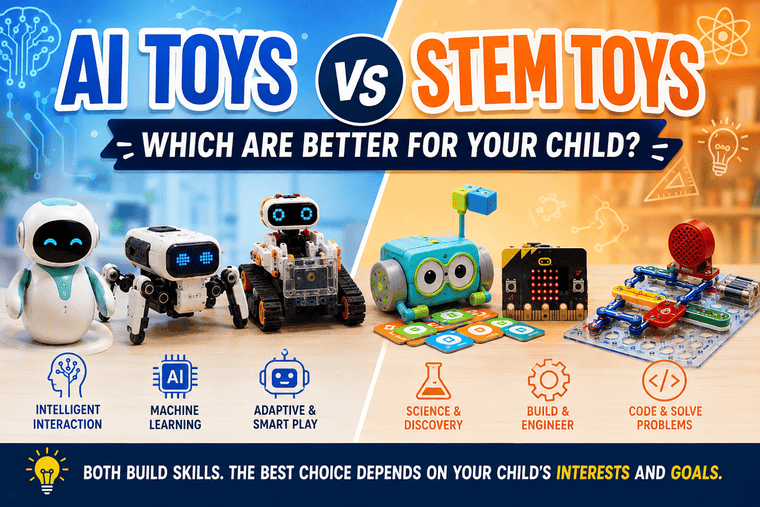
Walk through the toy section today and you will see plenty of products promising to teach children coding, robotics, engineering, and even artificial intelligence. For parents, all those labels can make choosing a toy harder than expected.
Should you buy an AI toy that introduces your child to machine learning? Or would a traditional STEM toy that teaches coding, electronics, or problem-solving be a better choice?
The answer depends on your child’s age, interests, and how they like to learn.
AI toys can introduce children to technologies they are likely to encounter throughout school and later life. STEM toys often take a broader approach, helping children understand coding, science, engineering, maths, electronics, and logical thinking.
In this AI toys vs STEM toys comparison, we will look at the differences, benefits, and some useful products from both categories.
AI Toys vs STEM Toys: What’s the Difference?
The terms overlap quite a bit, but they do not mean exactly the same thing.
AI toys use or teach concepts related to artificial intelligence. This might include machine learning, pattern recognition, computer vision, adaptive responses, or AI-assisted programming.
STEM toys focus on science, technology, engineering, and mathematics. A STEM toy could be a coding robot, electronics kit, building set, science kit, or programmable computer.
This means an AI toy can also be a STEM toy.
The Thames & Kosmos KAI robot, for example, teaches machine learning while also introducing robotics and engineering. It fits both categories. KAI allows children to collect data from gestures and sounds, train an AI model, and then use the model to control the robot.
A traditional electronics kit such as Snap Circuits, on the other hand, is clearly a STEM toy but does not need artificial intelligence to provide educational value.
That distinction is worth remembering when shopping. A toy does not automatically become better for learning simply because “AI” appears on the packaging.
Quick Comparison: AI Toys vs STEM Toys
| AI Toys | STEM Toys | |
|---|---|---|
| Main focus | AI, machine learning and smart technology | Science, coding, engineering and maths |
| Good for | Understanding newer technologies | Building broad technical skills |
| Typical activities | Training models, smart robotics, AI-assisted coding | Building, coding, circuits and experiments |
| Screen use | Often requires an app or device | Can be screen-based or completely screen-free |
| Creativity | Depends heavily on the product | Often strong with open-ended kits |
| Best for beginners | Depends on complexity | Many options for very young beginners |
| Long-term learning | Good when the AI features are meaningful | Often excellent with expandable kits |
Now let’s look at some toys that show these differences more clearly.
3 AI and Smart Toys Worth Considering
1. Thames & Kosmos KAI: Best for Understanding Real AI
Best for: Children curious about artificial intelligence
Age: 10+
Teaches: Machine learning, AI, robotics and engineering
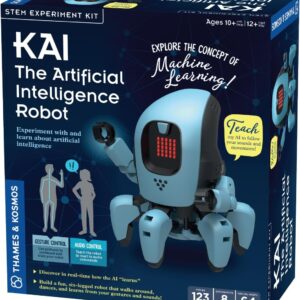
If your child keeps asking how artificial intelligence actually works, Thames & Kosmos KAI is one of the more interesting educational choices.
Children begin by building the six-legged robot from more than 100 pieces. They can then use an app and a compatible smartphone or tablet to collect data based on gestures and sounds.
This is where KAI becomes different from an ordinary programmable robot.
Children use the collected data to train an AI model. The model learns to recognise patterns and associate them with movements such as walking, turning, and stopping. Thames & Kosmos specifically designed the kit to demonstrate how machine learning uses data to recognise patterns and make predictions.
That gives children a practical way to see why training data matters.
If the AI does not recognise a gesture properly, they can collect more examples and try again.
There is a valuable lesson hidden in that process. AI is not magic. Its results depend partly on the information it receives and how it has been trained.
Why choose it: KAI is our pick for children who want to learn about AI rather than simply play with a toy marketed as “smart.”
2. Makeblock mBot2: Best for Coding, Robotics and AI
Best for: Kids ready for more advanced technology
Teaches: Block coding, Python, robotics, sensors and AI
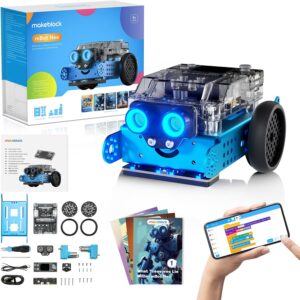
The Makeblock mBot2 is a good example of how AI and STEM learning can meet in the same product.
Children can begin with block-based programming and later move into Python. That makes the robot accessible to beginners while leaving room for more advanced projects.
Makeblock also supports machine-learning activities through its mBlock platform, including image, pose, and video recognition.
The robot’s sensors allow children to experiment with movement, navigation, environmental information, and automated behaviour.
Instead of simply pressing a button and watching something happen, kids can ask:
Why did the robot stop?
What did its sensor detect?
How can I change the program?
What happens if I give it a different instruction?
That process of testing, failing, adjusting, and trying again is one of the most useful parts of learning to code.
Why choose it: mBot2 makes sense for a child who already enjoys technology and needs something with more room to grow.
3. Energize Lab Eilik: Best for Exploring Interactive Robots
Best for: Children fascinated by robot personalities
Focus: Interaction, reactions and robotics
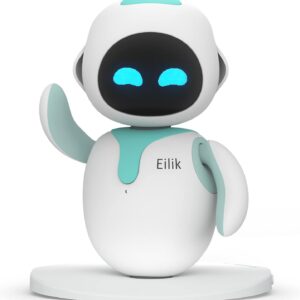
Eilik approaches smart technology from a very different direction.
It is an expressive desktop companion robot designed around interaction. Children can touch it, watch its reactions, play with it, and see its animated expressions.
Eilik is better described as an interactive smart robot than a machine-learning education kit like KAI.
That difference is actually useful for this comparison.
Children often assume that any robot that appears to have emotions must be using advanced artificial intelligence. Parents can use toys like Eilik to talk about how software, sensors, animations, and programmed behaviours can make a machine appear surprisingly lifelike.
Ask your child why they think Eilik reacted a certain way. Does the robot actually feel happy or upset? How might it know that someone touched it?
Those conversations can help children develop a more realistic understanding of smart technology.
Why choose it: Eilik is better suited to children interested in interactive robots than children specifically looking for coding lessons.
3 STEM Toys Worth Considering
4. Learning Resources Botley: Best Screen-Free STEM Toy for Younger Kids
Best for: Younger beginners
Age: 5+
Teaches: Coding logic, sequencing and problem-solving
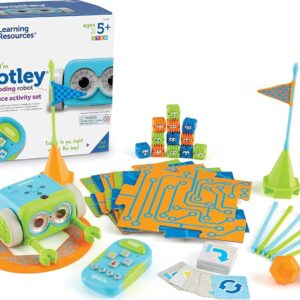
Botley is a good reminder that a toy does not need artificial intelligence to teach valuable technology skills.
The 77-piece activity set introduces children to basic programming without requiring a phone or tablet. Children use a remote programmer to give Botley instructions and then watch it carry them out.
They can build obstacle courses, create sequences, use loops, experiment with if/then logic, and programme Botley to detect and avoid objects. Learning Resources describes the 77-piece version as completely screen-free and suitable for children from age five.
This makes Botley particularly interesting for parents who want to introduce technology while keeping screen use under control.
If reducing unnecessary device use is already a concern in your home, our guide on how to limit screen time for kids effectively has more practical ideas.
Why choose it: Botley is one of the better choices for younger children who are completely new to coding.
5. Vilros BBC micro V2 Starter Kit: Best for Creative STEM Projects
Best for: Kids who like inventing and experimenting
Teaches: Programming, electronics and computational thinking
See Vilros BBC Micro V2 Basic Starter Kit
The BBC micro V2 takes a more open-ended approach to STEM learning.
Rather than giving children one finished robot with a fixed purpose, micro gives them a tiny programmable computer they can use in many different projects.
Kids can create simple games, displays, counters, alarms, experiments, and electronic inventions. As their skills improve, they can connect additional components and create more complicated projects.
This freedom can make a big difference for children who enjoy asking, “What else can I make?”
It also means the micro can remain useful after the novelty of the first project wears off.
That open-ended style of play fits well with other hands-on learning activities. Parents looking for more ideas can explore our guide to indoor activities that promote learning.
Why choose it: The micro is a strong choice for creative children who would rather invent their own projects than follow one fixed path.
6. Snap Circuits Jr. SC-100: Best for Learning Electronics
Best for: Kids interested in how electronics work
Age: 8+
Teaches: Circuits, electricity, engineering and problem-solving
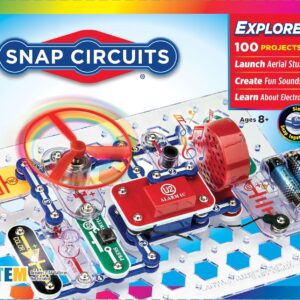
Not every useful technology toy needs a robot.
Snap Circuits Jr. SC-100 introduces children to electronics by allowing them to build working circuits from snap-together components.
This makes it particularly useful in an AI toys vs STEM toys comparison.
With an AI robot, much of the interesting technology may be hidden inside the device. With Snap Circuits, children physically put components together and see how a circuit works.
That can help make concepts such as switches, electrical connections, sound, motors, and power easier to understand.
There is also something satisfying about building a circuit, discovering that it does not work, and then finding the connection that was placed incorrectly.
It teaches children that getting something wrong is often simply part of figuring out how it works.
Why choose it: Snap Circuits is a good choice for children who are more interested in electronics and engineering than robots.
AI Toys vs STEM Toys: Which Teach More?
Neither category automatically teaches more.
It depends on the toy.
A well-designed AI toy such as KAI can introduce concepts that a traditional science kit cannot. Children can see how data is collected and used to train a machine-learning model.
On the other hand, a STEM kit such as micro can offer hundreds of possible projects and years of experimentation.
The better question is:
What will my child actually do with this toy?
If the answer is mostly “watch it perform,” the educational value may be limited.
If the child has to build, programme, experiment, make decisions, solve problems, or correct mistakes, there is usually more room for meaningful learning.
Which Is Better for Younger Children?
For younger children, traditional STEM toys often have an advantage.
AI can be an abstract concept. A five-year-old does not necessarily need to understand machine-learning models.
They can, however, understand:
“Tell Botley to move forward twice and then turn left.”
That introduces sequencing and logic in a very concrete way.
Botley is designed for children from age five and can operate without a phone or tablet.
Building sets, puzzles, simple science experiments, and age-appropriate coding toys can provide an excellent STEM foundation before children move into more complicated AI concepts.
Which Is Better for Older Kids?
AI toys become more interesting as children start asking deeper questions about technology.
Older children may want to understand why an AI system recognises one object but not another, how robots use sensors, or why training data affects an AI model.
That is where products such as KAI and mBot2 become particularly useful.
KAI directly introduces machine-learning training, while mBot2 provides a path from block coding into Python and machine-learning projects.
For a child who already has basic coding experience, that extra complexity can keep the toy interesting for longer.
What About Screen Time?
This is one area where parents should look at individual products rather than categories.
Some AI toys require apps, tablets, or phones because their AI features need cameras, microphones, or software.
Some STEM products also require screens for coding.
Others do not.
Botley is a good example of a completely screen-free coding toy. Snap Circuits also puts most of the activity into physically building electronic circuits.
A screen is not automatically bad for learning. Programming a robot for 30 minutes is very different from watching short videos for 30 minutes.
Still, families trying to build healthier technology habits may want a mixture of digital and screen-free activities. Our article on parenting in the digital age looks more closely at finding that balance.
Are AI Toys Safe for Kids?
This deserves attention whenever a toy connects to the internet or uses cameras, microphones, accounts, or cloud services.
Not all AI toys collect the same information, and not all smart robots work in the same way.
Before buying, parents should check whether the toy:
- requires an internet connection
- uses a microphone or camera
- stores voice recordings or images
- requires a child account
- sends information to cloud services
- offers parental controls
- allows stored information to be deleted
- needs a paid subscription for important features
Traditional STEM toys can sometimes avoid many of these concerns because their learning happens locally through physical components, coding, or electronics.
However, connected STEM products can have privacy considerations too.
The safest approach is to check the individual product rather than assuming every STEM toy is private or every AI toy is risky.
AI Toys vs STEM Toys: Which Should You Buy?
For most families, there is no need to choose one category forever.
A child’s interests will change as they grow.
For a 5 to 7-year-old beginner, we would lean towards a simple STEM toy such as Botley. It introduces coding logic without making the experience overly complicated.
For a child interested in electronics, Snap Circuits Jr. SC-100 provides a hands-on introduction to circuits and engineering.
For a child who loves inventing, the BBC micro V2 offers considerable creative freedom.
For an older child specifically interested in artificial intelligence, Thames & Kosmos KAI is our strongest choice because machine learning is part of the actual activity rather than simply a marketing label.
For children interested in coding and robotics, Makeblock mBot2 provides a good middle ground between traditional STEM and AI.
And for children who simply love the idea of interacting with a little robot character, Eilik offers something different again.
Final Verdict: AI Toys or STEM Toys?
If we had to choose only one category for a child who is completely new to technology, we would usually start with STEM toys.
They provide a broad foundation in problem-solving, coding, engineering, electronics, and logical thinking. Those skills make more advanced AI concepts easier to understand later.
But for older children who already enjoy technology, the right AI toy can be a useful next step.
Products such as KAI allow children to see that artificial intelligence involves data, training, patterns, and predictions. mBot2 can take that learning further by combining coding, robotics, sensors, Python, and machine-learning projects.
So the real winner in the AI toys vs STEM toys debate depends on your child.
Do they like building? Choose a STEM kit.
Do they enjoy coding? Try a programmable robot or micro.
Are they constantly asking how AI works? An educational AI robot may be worth exploring.
The best toy is the one that gets your child experimenting rather than simply watching. If they are building, testing, asking questions, getting things wrong, and trying again, they are already learning skills that will matter in a technology-filled future.

Add Comment